Mastering Maya Animation: From Bounces to Lip-Sync with Expert Hyeonseok Yang
🧐 When your character animations feel lifeless and stiff, and Maya’s core functions seem overwhelming.
 There’s a common hurdle many 3D animators face: creating movement that feels alive. You meticulously keyframe, but the final output lacks that essential spark. This often boils down to a misunderstanding of fundamental motion theory and how to translate it effectively within Maya. Forget endless tweaking; the real gains come from a solid foundation.
💡 3 Core Principles for Pro-Level Maya Animation
1. The ‘Why’ Behind the Movement: Structural Understanding is Key
The core of compelling animation isn’t just about making things move; it’s about understanding why they move. Before touching Maya, take time to analyze the object’s structure and physics. For a bouncing ball, it’s gravity and elasticity. For a character, it’s anatomy, weight distribution, and how forces affect the body. This deep understanding informs every pose and timing decision. Instead of just copying references, ask yourself: “What forces are at play here? How does the object’s structure dictate its motion?” This shift in perspective is crucial for believable animation.
2. Master Maya’s Graph Editor for Precision Timing and Spacing
Many beginners overlook the power of Maya’s Graph Editor, treating it as a mere tool for adjusting curves. However, it’s your primary interface for controlling the feel of motion. Learn to manipulate tangents and keys to control spacing (how far an object moves between frames) and timing (the duration of an action). Experiment with different curve types to achieve snappy, energetic movements or smooth, flowing transitions. Understanding how keys influence the interpolation between poses is non-negotiable for creating impactful animation.
3. Audio-Driven Animation: Beyond Basic Lip-Sync
Lip-sync is more than just matching mouth shapes to vowels. It’s about conveying emotion and personality through facial expressions and head movements that are directly tied to the audio. This involves careful planning: analyze the dialogue for tone, pacing, and emotional cues. Then, map these nuances to specific facial controls and secondary movements. When building your lip-sync animation, remember to incorporate subtle head turns, blinks, and eyebrow movements that naturally accompany speech. This layered approach makes the character feel genuinely present and responsive to the audio.
🛠️ Key Skills & Details That Define Professional Quality
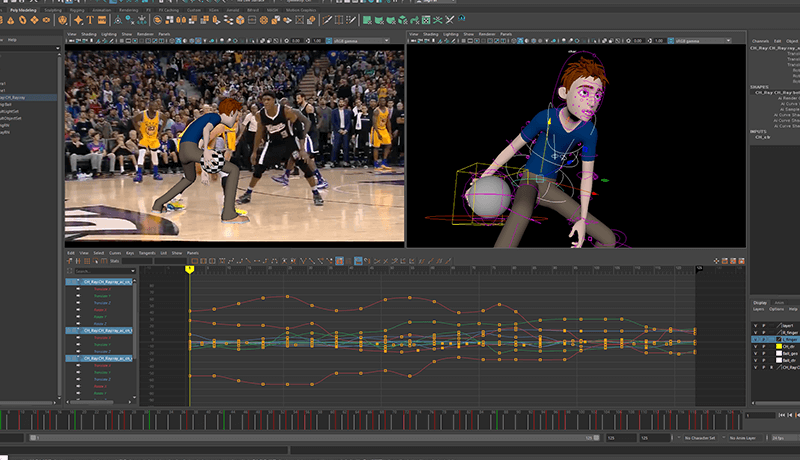
Moving beyond theoretical principles, practical application in Maya is where your animation truly takes shape. This involves mastering core functions that streamline your workflow and enhance quality.
- Reference-Driven Body Mechanics: The ability to accurately observe and replicate human (or creature) body mechanics is paramount. Actively use live-action or reference footage to understand weight transfer, follow-through, and the subtle counter-movements that make actions feel grounded. This isn’t about rote imitation but about understanding the underlying principles and applying them to your character.
- Expressive Posing and Silhouette: A character’s pose is their immediate statement. Focus on creating strong silhouettes that are readable from a distance. This involves mastering key poses that define the emotion and action of a scene. Learn to use the Body Animation Production Process to build a library of dynamic poses that communicate character and intent.
- Seamless Workflow Integration: Professional animation isn’t created in a vacuum. Understanding how your animation fits into the larger pipeline, especially with audio, is vital. Developing a systematic approach to audio lip-sync and facial animation, integrating it smoothly with body animation, ensures a cohesive final product. This includes efficient use of Maya’s tools for facial rigging and animation, allowing for rapid iteration and polish.
💬 Frequently Asked Questions
Q. How can a 3D Animator effectively use basic rigging assets to learn animation principles in Maya?
A. 3D Animators can leverage basic rigging assets by focusing on how different movements, like a ball bounce or a pendulum swing, demonstrate core animation principles such as squash and stretch, timing, and spacing. Animating these simple objects first helps solidify the foundational understanding before moving to complex character rigs.
Q. What is the most efficient way for a 3D Animator to understand and apply natural, live-action based animation in Maya?
A. A 3D Animator can best achieve this by actively using reference footage. Breaking down observed movements into key poses and analyzing the timing and weight transfer allows for a practical translation into Maya. Focus on understanding the body’s mechanics and then recreating those principles with your character rig.
Q. How can a 3D Animator develop an unrivaled cartoony and snappy animation style in Maya?
A. A 3D Animator can cultivate this style by pushing the exaggerations of core animation principles like squash and stretch, anticipation, and timing. Focusing on strong poses, clear silhouettes, and precise control over the Graph Editor for sharp, dynamic movements will contribute significantly to a snappy, cartoony feel.