Blender Cartoon Rendering: Why Your Toon Shading Looks Flat (And How to Fix It)
🧐 That moment when your perfectly modeled character ends up looking dull and lifeless…
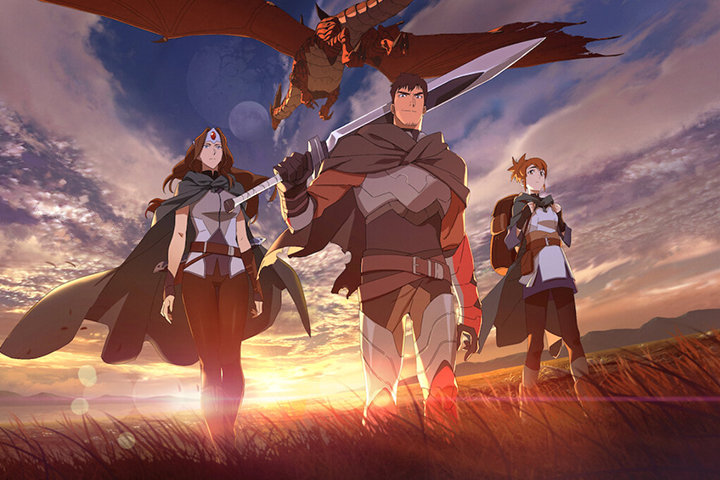 You meticulously follow tutorials, adjust settings, and yet, that vibrant, eye-catching cartoon look remains just out of reach. The issue often isn’t a lack of skill, but a misunderstanding of the core principles behind effective toon shading. Many practitioners get stuck focusing solely on techniques, overlooking the foundational theories that truly unlock that professional polish.
💡 Three Pro-Level Shifts for Killer Cartoon Rendering
This expert dives deep into the ‘why’ behind the ‘how,’ transforming your approach to 3D cartoon rendering.
1. Theory First, Technique Second: The Foundation of Your Style
It’s not just about learning the buttons to click in Blender. It’s about understanding why you’re using certain tools and settings. This expert emphasizes that grasping the underlying theory – be it light, form, or anatomy – allows you to adapt techniques to any scenario, rather than just blindly following steps. This leads to a more versatile and unique artistic output.
2. Master the Pipeline: From Modeling to Compositing with Efficiency
Professional-grade cartoon rendering isn’t one person’s isolated effort; it’s a pipeline. The key to speed and quality lies in understanding how each stage connects. This expert highlights how a clear workflow, from concept to final compositing, with smart use of Blender’s features like Line Art and Auto-rigging add-ons, drastically reduces production time and boosts consistency.
3. The Art of the Outline: Making Your Characters Pop
In cartoon rendering, the outline is king. It defines the silhouette and brings 2D appeal into the 3D space. This expert reveals how to leverage Blender’s native Line Art feature effectively, not just as a post-processing effect, but as an integral part of the rendering pipeline. Mastering this crucial element is a game-changer for achieving that polished, illustration-like quality.
🛠️ Key Skills & Details That Define Professional Quality
Moving beyond basic techniques, achieving a truly professional look in cartoon rendering involves a nuanced understanding of how different elements interact. It’s about translating the aesthetic of concept art into a tangible 3D form that resonates.
- Modeling with Intent: Understanding anatomical forms and proportions is crucial, even for stylized characters. This isn’t about photorealism, but about creating believable shapes that align with the intended style. Correcting normals and utilizing data transfer techniques ensures your geometry behaves as expected during shading and rendering.
- Texturing and Shading for Impact: Creating your own textures within Blender, and understanding shader structures, gives you granular control. This allows for unique surface qualities that go beyond generic presets. Learning how to link these to other programs based on shader understanding ensures flexibility. The focus is on achieving specific visual styles, whether for game assets, character figures, or animation models, by applying textures and shaders that enhance the cartoon aesthetic.
- Rigging and Compositing for Polish: Simple Auto-rigging and the use of add-ons can streamline the animation-ready process. More importantly, understanding compositing nodes allows for the seamless integration of background elements and final touches that elevate the overall image quality. This includes strategically using effects to enhance the illustrative feel.
💬 Frequently Asked Questions
Q. As a 3D Artist, how do I effectively differentiate between working on a hobby project versus a professional commission in Blender?
A. The core difference lies in stakes and structure. Professional work involves deadlines, client expectations, and collaboration, pushing for optimization and adherence to project rules. Hobby projects offer greater freedom, allowing for more experimental exploration without external pressure. While the quality output can be similar, the professional environment demands a different mindset regarding schedule management and teamwork.
Q. As a 3D Artist, I often struggle with applying theoretical knowledge from tutorials to my own unique character designs in Blender. How can I bridge this gap?
A. The key is to prioritize understanding the ‘why’ behind each technique. Instead of just following steps, ask yourself why a specific tool or setting is used. This theoretical grounding, combined with consistent practice, empowers you to adapt learned principles to your own creative vision. Regularly referencing artistic theories, like those in 2D art concerning light and proportion, can also inform your 3D decisions, making your designs more robust.
Q. As a 3D Artist, how can I best leverage online learning resources like Coloso alongside other platforms like YouTube for continuous improvement in Blender cartoon rendering?
A. Structured courses, like those on Coloso, provide a comprehensive curriculum that builds foundational knowledge and connects disparate concepts. Use these as your primary learning structure. When specific gaps arise or you want to explore a niche technique not covered, then turn to YouTube for supplementary information. Always cross-reference conflicting information by referring back to your foundational theories and the Blender Manual. Developing strong search skills is essential for effectively filtering fragmented information online.
👉 Want to Go Deeper?
Ready to transform your 3D characters with stunning cartoon rendering? Explore the complete curriculum and unlock more expert insights.