Fixing Your Cartoon Girl Models: Taeckgyu Han’s Toon Shading Workflow
🧐 That Frustrating Gap Between Your Model and a 2D Vibe
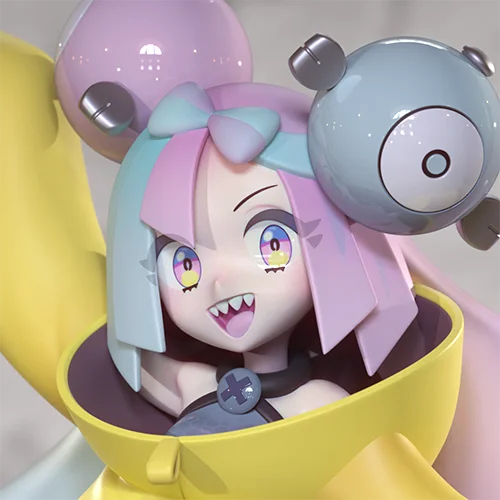
You spend hours perfecting a character model, only for it to fall flat when you try to achieve that crisp, 2D cartoon look. It feels like something’s missing, that crucial element that bridges the gap between 3D form and hand-drawn appeal. Often, the solution isn’t about more complex modeling, but a fundamental shift in how you approach the shading and presentation.
💡 Three Essential Principles for Professional Toon Shading
1. Master the Art of Value-Based Presentation
This isn’t about creating a perfectly clean, ‘pretty’ model in the traditional sense. The core principle here is controlling the visual presentation based on value. Think about how a 2D artist uses line weight and shading to define form. Your goal is to mimic that through your shaders and texture work. It’s about strategic edge control and thoughtfully applied color ramps that read clearly, even when the model is viewed from different angles.
2. Optimize Your Workflow with Engine-Specific Shaders
Understanding how both 3ds Max and Unity’s toon shaders function is key to an efficient workflow. Don’t just apply a shader and hope for the best. Dive into the specifics of each tool. For 3ds Max, this means understanding how to set up custom materials that define your character’s outlines and shading. For Unity, it involves leveraging their robust Toon Shader capabilities to achieve the desired stylized look without overwhelming your project’s performance. This dual approach ensures your character looks fantastic in both your modeling environment and the target game engine.
3. Polish with the ‘Professional Touch’ Details
The difference between a good character and a great one often lies in the minute details. This means going beyond basic modeling and texturing. Focus on enhancing expressiveness through subtle adjustments. Consider how you apply textures, the placement of your seams during UV unwrapping for clean blending, and how you rig your character for dynamic poses. These are the small, deliberate choices that elevate your model from competent to captivating.
🛠️ Key Skills & Details That Define Professional Quality
Achieving that authentic 2D feel in 3D isn’t about having a massive poly count or the most advanced render settings. It’s about smart application of techniques that mimic hand-drawn aesthetics.
- Poly Modeling Fundamentals: Start with a solid understanding of polygon modeling. This includes building clean base meshes that can be easily manipulated. For instance, when creating a star shape, instead of relying on pre-set tools, you can construct it from a cylinder by extruding, collapsing edges, and utilizing symmetry. This approach trains you to think in terms of foundational forms.
- Efficient UV Unwrapping for Stylization: The process of UV unwrapping is critical for toon shading. Focus on creating clean seams that contribute to the overall aesthetic, not detract from it. Tools like
Straighten SelectionandRelaxin your UV editor can help create flat, easy-to-texture layouts, which is essential for achieving consistent shading and avoiding stretching that breaks the 2D illusion. - Strategic Shader Setup: When working with toon shaders, understand the importance of defining outline thickness and shading falloff. This often involves tweaking parameters like edge width, shadow bias, and color ramps. The goal is to create clear silhouettes and distinct tonal areas, much like a traditional drawing.
- Hair Modeling Techniques: Creating stylized hair involves specific workflows. For example, a French roll hairstyle can be achieved by starting with a bent cylinder, applying a
Twistmodifier, and carefully adjusting the Gizmo’s axis to control the curl. Using tools likeFFDorShellcan then add volume and refine the shape for a more naturalistic yet stylized appearance.
💬 Frequently Asked Questions
Q. How can a 3D Character Artist create a character that looks truly like a 2D drawing?
A. A 3D Character Artist can achieve this by mastering toon shading techniques. This involves carefully controlling the model’s visual presentation through shaders that define clear outlines and distinct shading zones, often mimicking the value and line work of traditional 2D art. Focusing on precise UV unwrapping and strategically applying textures also plays a crucial role.
Q. What’s the most efficient way for a 3D Character Artist to learn toon shading in 3ds Max and Unity?
A. The most efficient approach for a 3D Character Artist is to study the specific toon shader implementations within each software. This means understanding 3ds Max’s material setup for stylized rendering and how to leverage Unity’s Toon Shader to achieve desired visual effects. Learning by deconstructing existing successful 2D-style models and practicing with provided assets can accelerate understanding.
Q. What study habits should a 3D Character Artist adopt to stay competitive in character modeling and toon shading?
A. A 3D Character Artist should cultivate consistent study habits. This includes daily practice, staying updated on new software versions and techniques, and actively seeking out well-made examples to analyze and recreate. Developing the ability to adapt to new tools and workflows, as well as practicing with a focus on finishing projects, is crucial for continuous skill improvement and long-term success in character modeling.