💡 Redhong’s Essential Tips for Believable Environments
1. Harnessing Atmospheric Effects for Unique Lighting
Concept Artist Redhong emphasizes that atmospheres are more than just pretty visuals; they dictate your scene’s lighting. Instead of assuming Earth-like conditions, actively experiment with unusual colors for ambient lighting to create distinct alien worlds. Redhong demonstrates how adjusting ‘Air’, ‘Dust’, and ‘Ozone’ in Sky Texture settings can dramatically alter your scene’s mood and believability. This focus on atmospheric science translates directly into more compelling concept art.
2. Strategic Use of Blender’s Mix Node for Material Unity
Achieving a cohesive look between different environmental elements, like structures and cliffs, is crucial. Redhong shows a practical workflow using Blender’s Mix node. By copying and pasting shader nodes and linking them correctly with the Mix node set to Multiply, you can seamlessly blend materials. This technique ensures that disparate elements appear to be made of the same substance, creating a more unified and naturalistic scene.
3. The Finishing Touch: Strategic Fog and Lighting Layering in Photoshop
Once the base render is complete, the real magic happens in post-processing. Redhong’s approach involves using Blender’s ‘Principled Volume’ shader for subtle fog effects and then layering rendered passes in Photoshop. By adjusting levels, blend modes like Soft Light and Darken, and creating masks, you can precisely control depth and lighting. This deliberate layering process, especially when fine-tuning values and contrast, is what transforms a good render into a professional-level piece.
🛠️ Key Skills & Details That Define Professional Quality
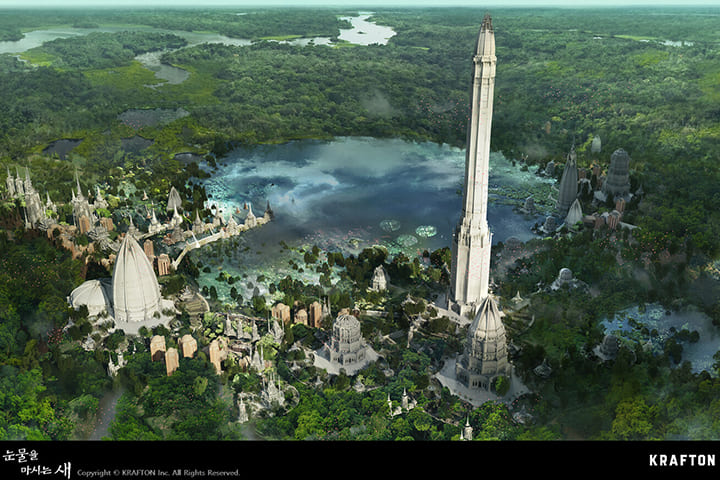
Beyond just knowing the software, a concept artist’s strength lies in understanding how to manipulate the visual information. Redhong stresses the importance of silhouette clarity and value control.
- Refining Silhouettes with Brushes: Use tools like the Mix Brush to blend and refine forms without losing the core shape. Remember, the goal is to clarify the intended silhouette, not just soften edges.
- Strategic Value Division: When painting in Photoshop, mentally divide your scene into foreground, middle ground, and background. Adjusting levels and using blend modes like Soft Light and Lighten on separate layers helps emphasize this depth. Aim for at least three distinct value zones.
- Atmospheric Overpainting: Don’t shy away from intentional blurring. Redhong notes that alien atmospheres often obscure details. Using the Smudge tool carefully can help replicate this effect, creating a more realistic and atmospheric feel. Always balance refinement with atmospheric accuracy.
💬 Frequently Asked Questions
Q. What specific Blender features does Concept Artist Redhong recommend for efficiency?
A. Concept Artist Redhong highlights the utility of the Asset Browser for quickly accessing and reusing 3D creations. They also mention the usefulness of Blender’s Modify and Sculpting features for shaping objects and the benefits of using HDRIs and sky textures for realistic lighting setup.
Q. How does Concept Artist Redhong approach creating a sense of depth in their scenes?
A. Concept Artist Redhong emphasizes a multi-layered approach in Photoshop post-rendering. This includes using rendered passes like Mist and Ambient Occlusion, adjusting levels to define foreground, middle ground, and background, and strategically applying masks with brushes set to different blend modes to enhance contrast and atmospheric perspective.
Q. What is Concept Artist Redhong’s core philosophy on learning new software features versus mastering fundamentals?
A. Concept Artist Redhong advises prioritizing fundamental design skills and visualization techniques over constantly chasing new software add-ons. While acknowledging that new tools can be inspiring, they stress that a strong understanding of design principles allows artists to leverage any tool effectively, ensuring the core creative process remains solid.
👉 Want to Go Deeper?
Discover all 50 lectures and unlock the full potential of your concept art skills.