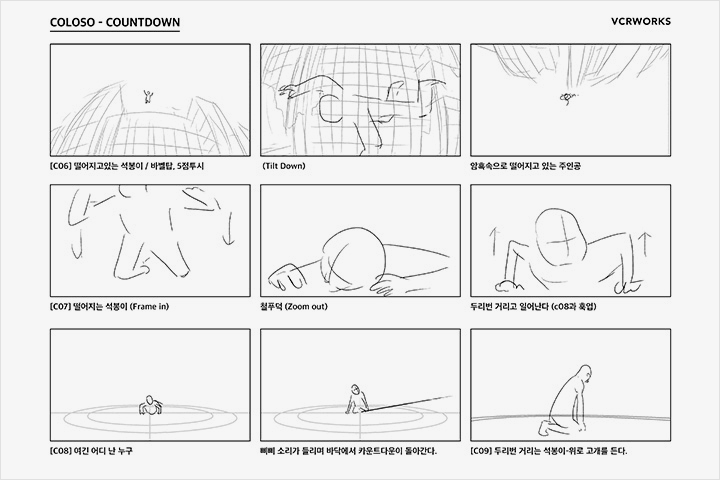
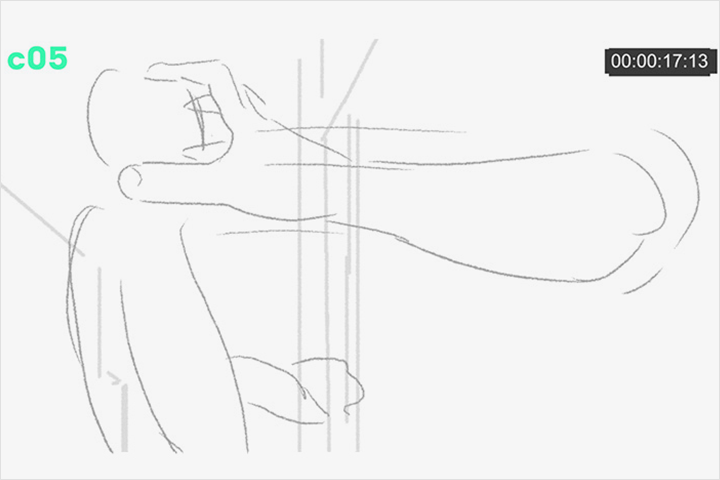
{ “frontmatter”: { “title”: “Mastering 2D Animation: VCRWORKS’ Workflow Secrets Revealed”, “description”: “Unlock VCRWORKS’ expert techniques for dynamic 2D animation, from initial concepts to final touches. Learn essential workflow tips and software secrets to elevate your craft.”, “pubDate”: “2026-04-25”, “updatedDate”: “2026-04-25”, “author”: “VCRWORKS”, “slug”: “vcrworks-animation-masterclass”, “heroImage”: “{HERO_IMAGE_URL}”, “course_id”: “219635”, “instructor”: “VCRWORKS”, “category”: “Animation”, “tags”: [ “Animation”, “2D Animation”, “VCRWORKS”, “Coloso”, “CourseReview”, “Digital Art” ] }, “body”: [ { “type”: “heading”, “level”: 1, “children”: [ { “type”: “text”, “value”: “Mastering 2D Animation: VCRWORKS’ Workflow Secrets Revealed” } ] }, { “type”: “heading”, “level”: 2, “children”: [ { “type”: “text”, “value”: “When Your Dynamic Actions Fall Flat: The Continuity Fix” } ] }, { “type”: “image”, “url”: “https://cdn.day1company.io/prod/uploads/202210/142339-765/2danimation-vcrworks-example-01.png”, “altText”: “2D Animation Workflow Example” }, { “type”: “paragraph”, “children”: [ { “type”: “text”, “value”: “You meticulously plan a character’s explosive trajectory, the mid-air spin, and the gravity-driven slide… yet the final animation feels disjointed. The culprit? A disconnect in continuity, especially with rapid, complex movements. The fix often lies in how you approach animatics and the subtle camera choreography.” } ] }, { “type”: “heading”, “level”: 2, “children”: [ { “type”: “text”, “value”: “VCRWORKS’ 3 Core Principles for Seamless Animation” } ] }, { “type”: “heading”, “level”: 3, “children”: [ { “type”: “text”, “value”: “1. Master the ‘Hook-Up’: Connecting Cuts Through Movement” } ] }, { “type”: “paragraph”, “children”: [ { “type”: “text”, “value”: “The key to making big, fast movements recognizable and smooth is focusing on ‘hook-ups’ in your animatic. This means ensuring a character’s position or movement in one cut naturally leads into the next. For instance, when a character is thrown away by an explosion, showing their back in the subsequent shot creates a seamless transition. It’s not just about learning the technique of showing the back; it’s about shifting your mindset to think about how each shot connects to the next as a continuous flow.” } ] }, { “type”: “heading”, “level”: 3, “children”: [ { “type”: “text”, “value”: “2. Dynamic Screen Coverage: Guiding the Viewer’s Eye” } ] }, { “type”: “paragraph”, “children”: [ { “type”: “text”, “value”: “To keep viewers engaged, avoid letting their eyes settle in one static spot. VCRWORKS strategically places characters across the screen, moving them up, down, and diagonally. This dynamic coverage, often achieved by adjusting size and position based on the intended camera movement, prevents the animation from feeling monotonous. A practical routine is to draft these placements in the animatic first to minimize layout changes later.” } ] }, { “type”: “heading”, “level”: 3, “children”: [ { “type”: “text”, “value”: “3. The ‘Ball’ Method for Spacing and Timing” } ] }, { “type”: “paragraph”, “children”: [ { “type”: “text”, “value”: “When blocking out movements, start by drawing the character as a simple ball. This efficient method makes it easier to establish spacing, timing, and plan squash and stretch. Extending frames for clarity or adjusting timings by continuously playing the animation is crucial. This overall approach—focusing on the broad shape first, then refining—is far more efficient than getting lost in minor details early on.” } ] }, { “type”: “link”, “url”: “https://coloso.global/en/products/animationstudio-vcrworks-us?utm_source=blog&utm_medium=organic&utm_campaign=pro_regular_animationstudio-vcrworks-us_auto_all&utm_content=mediadesign_animationstudio-vcrworks-us_gsd-autoblog-review-post-260425”, “children”: [ { “type”: “text”, “value”: “[Learn More]” } ] }, { “type”: “horizontalRule” }, { “type”: “heading”, “level”: 2, “children”: [ { “type”: “text”, “value”: “Key Skills & Details That Define Professional Quality” } ] }, { “type”: “image”, “url”: “https://cdn.day1company.io/prod/uploads/202210/142345-765/2danimation-vcrworks-example-02.png”, “altText”: “2D Animation Software Tips” }, { “type”: “paragraph”, “children”: [ { “type”: “text”, “value”: “Translating the theory of continuity into actual work requires specific practical skills. For dynamic actions, focusing on ‘visible arcs’ is paramount. When a character’s movement deviates from a smooth curve, it looks awkward. Consider how a stone thrown into a calm lake creates more distinct ripples than one tossed into waves. Ensuring these arcs are present, even with sharp direction changes like collisions, adds a professional polish. VCRWORKS animators emphasize differentiating silhouettes and using contrasting movements—like straight lines against gentle curves—to highlight these pivotal moments.” } ] }, { “type”: “paragraph”, “children”: [ { “type”: “text”, “value”: “Pay close attention to mise-en-scène: every visual element on screen, including color contrast and character placement, impacts how the audience perceives movement. By planning these elements early, even complex actions become intuitive and easy to understand. For instance, when animating a character’s rotation, consider how the distribution of light and dark areas (like the character’s body vs. head) changes the visual impact.” } ] }, { “type”: “paragraph”, “children”: [ { “type”: “text”, “value”: “When refining movements, remember the importance of ‘visible parts.’ Even with 24 FPS animation, drawing every frame meticulously isn’t always feasible. Instead, select key movements and create 2-3 frames for each. The goal is to make these key poses clear and expressive. The hands and legs, for example, should form a visible line and not be obscured by the body, ensuring their motion is easily perceived. This focus on clarity, combined with subtle exaggeration and distortion, is what brings characters to life.” } ] }, { “type”: “horizontalRule” }, { “type”: “heading”, “level”: 2, “children”: [ { “type”: “text”, “value”: “Frequently Asked Questions” } ] }, { “type”: “heading”, “level”: 4, “children”: [ { “type”: “text”, “value”: “Q. How does Animationstudio VCRWORKS ensure continuity in fast-paced action sequences?” } ] }, { “type”: “paragraph”, “children”: [ { “type”: “text”, “value”: “Animationstudio VCRWORKS prioritizes ‘hook-ups’ in their animatics, connecting sequential shots through character position and movement. They also utilize dynamic screen coverage by strategically placing and moving characters, ensuring their entire body is visible and guiding the viewer’s eye.” } ] }, { “type”: “heading”, “level”: 4, “children”: [ { “type”: “text”, “value”: “Q. What is the ‘ball method’ Animationstudio VCRWORKS recommends for initial blocking?” } ] }, { “type”: “paragraph”, “children”: [ { “type”: “text”, “value”: “The ‘ball method’ involves drawing the character as a simple sphere to establish spacing, timing, and plan squash and stretch effects more easily. This foundational step helps in creating dynamic movements and provides a clearer base for further refinement.” } ] }, { “type”: “heading”, “level”: 4, “children”: [ { “type”: “text”, “value”: “Q. What specific detail does Animationstudio VCRWORKS emphasize for expressive character acting?” } ] }, { “type”: “paragraph”, “children”: [ { “type”: “text”, “value”: “Animationstudio VCRWORKS emphasizes clearly showing key poses and ensuring that body parts, like arms and legs, form visible arcs and aren’t hidden. They also focus on subtle facial expressions and timing, such as controlling blinking frequency to enhance realism and convey emotion effectively.” } ] }, { “type”: “heading”, “level”: 2, “children”: [ { “type”: “text”, “value”: “Want to Go Deeper?” } ] }, { “type”: “list”, “ordered”: true, “children”: [ { “type”: “listItem”, “children”: [ { “type”: “paragraph”, “children”: [ { “type”: “link”, “url”: “https://coloso.global/en/products/animationstudio-vcrworks-us?utm_source=blog&utm_medium=organic&utm_campaign=pro_regular_animationstudio-vcrworks-us_auto_all&utm_content=mediadesign_animationstudio-vcrworks-us_gsd-autoblog-review-post-260425”, “children”: [ { “type”: “text”, “value”: “See VCRWORKS’s Full Curriculum” } ] } ] } ] } ] } ] }