💡 10 Years of Pro Know-How: Key Insights for Photorealistic Interiors
1. Mastering the Fundamentals: From Simple Props to Complex Spaces
The journey to photorealistic interiors begins not with grand architectural elements, but with a solid grasp of basic modeling. Start by creating everyday objects – a coffee cup, a book, a plant pot. This foundational practice hones your ability to observe form, understand topology, and develop efficient modeling techniques. Don’t rush past these simple objects; they are the building blocks for larger, more complex scenes and teach you how to think about geometry and detail in a way that scales effectively.
2. The Power of Two: Strategic Use of Cycles and EEVEE
Blender offers two powerful rendering engines: Cycles for ultimate photorealism and EEVEE for speed. The trick isn’t just knowing they exist, but understanding their strengths and weaknesses for different stages of your workflow. Use EEVEE for rapid prototyping, scene blocking, and checking lighting setups. Then, switch to Cycles for the final render where its advanced ray-tracing capabilities will deliver that crucial depth and accurate light bounces. Learning when and why to use each engine can drastically cut down on iteration time and improve final output quality.
3. Workflow Efficiency: Beyond Basic Modeling
Professional 3D work is as much about process as it is about artistry. Integrating external plugins and tools for tasks like scattering rocks, grass, or even generating complex geometry with Geometry Nodes can save countless hours. Understanding how to efficiently manage large-scale scenes, from exterior building models to detailed terrain and foliage, is key. This involves a systematic approach to asset placement, material application, and scene optimization to ensure your projects remain manageable and render smoothly, even with complex details.
🛠️ Key Skills & Details That Define Professional Quality
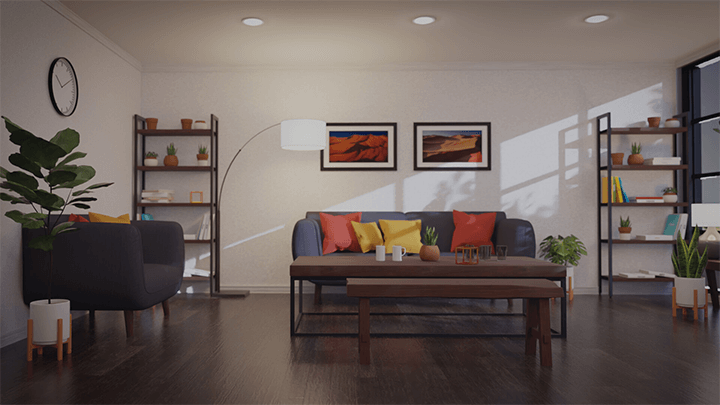
Moving beyond basic modeling, professionals achieve photorealism through a deep understanding of how light interacts with surfaces. This means meticulous attention to texture detail – not just the diffuse color, but also roughness, normal maps, and metallic values that dictate how light reflects and scatters. Mastering material shaders, especially for common interior elements like wood, fabric, and glass, is crucial. Furthermore, effective scene composition, using focal points and rule-of-thirds principles, guides the viewer’s eye and enhances the narrative of the rendered space. This level of polish, achieved through practical application of both modeling and shading know-how, transforms a good render into a great one.
💬 Frequently Asked Questions
Q. How can a 3D Artist start creating photorealistic interiors if they are new to Blender?
A. A 3D artist new to Blender should begin by mastering the interface and basic modeling techniques through simple prop creation. This builds a solid foundation before tackling complex interior scenes. Understanding the fundamental differences and use cases for Cycles and EEVEE rendering engines early on is also highly beneficial for efficient workflow.
Q. What is the most effective way for a 3D Artist to optimize rendering times for complex architectural scenes in Blender?
A. A 3D artist can optimize rendering times by strategically using EEVEE for scene setup and previews, reserving Cycles for final high-quality renders. Additionally, optimizing geometry, utilizing efficient texture maps, and carefully managing lighting setups are critical steps to reduce render times without sacrificing visual quality.
Q. As a 3D Artist, how can I ensure my interior lighting looks natural and photorealistic in Blender?
A. A 3D artist can achieve natural interior lighting by using realistic HDRI maps for ambient light and then supplementing with strategically placed interior lights that mimic real-world sources like lamps and ceiling fixtures. Paying close attention to light falloff, color temperature, and how light interacts with different surface materials is key to creating believable illumination.
👉 Want to Go Deeper?
This course dives deep into the practical, real-world techniques used by a seasoned 3D artist to create stunningly photorealistic interior and architectural visualizations with Blender.