Pixel Art Characters & Animation: From Hobby to Game Dev Pro
🧐 That Frustrating Moment When Your Pixel Art Feels Static
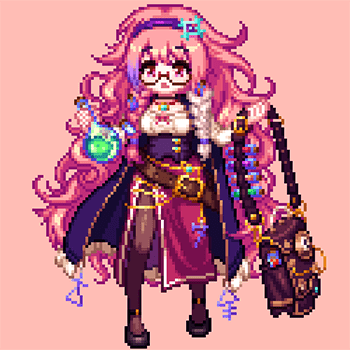 Your meticulously crafted pixel characters look great from the front, but presenting them from different angles feels like a whole new challenge. Often, the simple fix involves a fundamental shift in how you approach character construction and animation, a detail easily missed when you’re deep in the workflow.
💡 Three Pillars of Professional Pixel Art for Games
1. Mastering Multi-Perspective Character Design
This isn’t just about drawing from the side; it’s about understanding how a 3D form translates into 2D pixels consistently. The key is building your character with a clear understanding of its volume and how light interacts with it from all directions, even when working within a tight canvas of under 100 pixels. Think about how a simple sphere gains form with just a few carefully placed pixels for highlights and shadows.
2. Breathing Life into Characters with Essential Animation
Focus on the core animations that make a character feel alive in a game: idle, walk, run, jump, and attack. Instead of overcomplicating, concentrate on smooth transitions and impactful keyframes. A common pitfall is creating animations that feel choppy. The trick is to analyze real-world motion and break it down into the fewest, most effective pixel frames to convey the action clearly. This approach dramatically cuts down on production time while ensuring a fluid feel.
3. Crafting Game-Ready Assets: Icons and Textures
Beyond characters, many mobile games rely on detailed icons and item sprites, often around 32 pixels. The final polish comes from applying textures and subtle color variations that suggest material. Don’t just fill in colors; consider how light would reflect or absorb. For example, a metallic item will have sharper highlights than a wooden one, even at this tiny scale.
🛠️ Key Skills & Details That Define Professional Quality
Translating theoretical knowledge into tangible game assets requires a specific skillset focused on efficiency and visual impact. For character drawing, mastering clean line work and strategic pixel placement is paramount. This involves not just color selection, but also understanding how to use palettes that reflect current trends – like pastel tones – to make characters pop.
When it comes to animation, the focus shifts to conveying movement with minimal frames. This means understanding animation principles like anticipation and follow-through, even in a pixelated context. Learning to create natural top, quarter, and side views of characters involves more than just flipping an image; it requires rebuilding the form to maintain consistency. For item icons and other sprites, developing texture expressions that suggest detail within a small pixel count is crucial. Professionals leverage tools like Aseprite and Photoshop not just for drawing, but for efficient workflow management, including setting up custom color palettes and understanding how to optimize assets for various game engines.
💬 Frequently Asked Questions
Q. As a beginner pixel artist, what’s the most critical first step for creating mobile game characters?
A. Pixelartist advises focusing on understanding light and shadow from the very beginning. Even with a limited palette and small canvas size (like 16 or 32 pixels), correctly applying shading based on a light source will give your characters volume and make them look professional, rather than flat.
Q. How can a pixel artist make characters look dynamic from multiple angles without drawing each view from scratch?
A. Pixelartist suggests developing a solid understanding of the character’s 3D form before starting. This allows you to intelligently “rebuild” the character for different perspectives, ensuring consistency. Analyzing how real-world objects and characters change appearance from various viewpoints, then applying those principles to pixel construction, is key.
Q. What are the essential animation types a pixel artist needs to master for game production?
A. Pixelartist emphasizes mastering fundamental character animations such as idle, walking, running, jumping, and attacking. Beyond characters, understanding how to animate icons and specific objects is also vital for creating a complete game asset library. Focus on conveying the core action clearly and smoothly.