💡 Three Core Principles for Game-Ready Character Faces
1. Prioritize Wireframe Flow Over Perfect Geometry
The instinct is to make every polygon look perfect, like a clean square or triangle. However, when modeling for real-time characters, especially faces, the flow of your wireframe is paramount. This means creating edge loops that follow the natural contours and deformation areas of the face. Think of how muscles and skin stretch and compress.
- Method: Instead of getting bogged down in making each segment perfect early on, focus on establishing clean edge loops around the eyes, mouth, and jawline. These loops guide deformation and texturing. If a section looks messy but has good flow, it’s often better to leave it for later refinement. The goal is to create a structure that will hold up under animation.
2. Master the Silhouette: Your First Impression
The silhouette is the most critical aspect of a character’s design when viewed from a distance or in motion. For faces, this means nailing the head shape, jawline, and the profile. Even subtle adjustments here can drastically improve how recognizable and appealing the character is.
- Workflow: Analyze your reference from multiple angles constantly. Use tools like Symmetry and Mirror judiciously. A pro tip: set your center pivot to 0,0,0 early on for predictable mirroring and welding operations. When attaching separate pieces, focus on a clean bridge operation or vertex merging rather than relying solely on textures to define form. If a model part doesn’t connect cleanly, reconsider the topology or poly count.
3. The “Middle Poly” Hard Surface Approach
When dealing with armor or hard surface elements on a character, relying solely on textures to define thickness and form is a common pitfall. The “middle poly” concept emphasizes building actual geometry that suggests thickness and depth, even at a low poly count.
- Finishing Detail: Instead of just extruding and hoping for the best, use edge manipulation. Hold an edge and push down to create subtle thickness and form. This method ensures that normal maps will behave correctly and the perceived depth is genuine, not faked. If you encounter artifacts when using tools like Shift, consider using HPolish for cleaner final results or ensure your wireframe is rounded, not sharp, at the edges.
🛠️ Key Skills & Details That Define Professional Quality
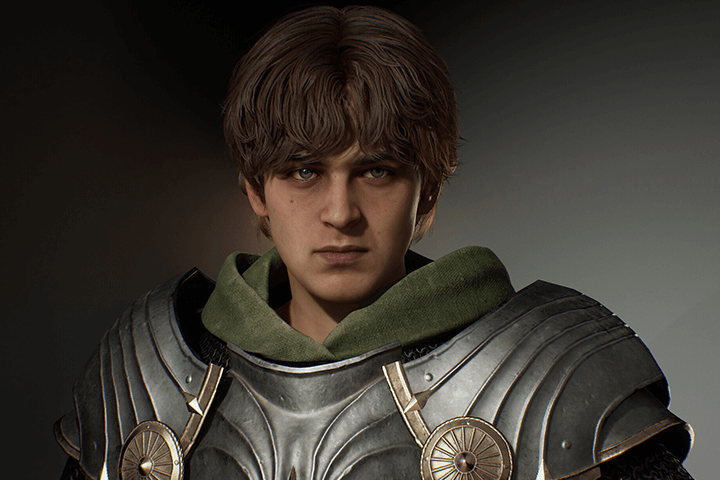 Creating game-ready characters goes beyond simply having the right software. It’s about developing an intuitive understanding of form, deformation, and efficient workflow.
- Topology for Deformation: When modeling the face, pay close attention to edge loops around the eyes and mouth. These need to have enough density and follow the natural muscle structures to allow for convincing expressions. If you see strange wire behavior or unnatural stretching, revisit your edge flow.
- Silhouette Refinement: Don’t just model the front view. Constantly check the profile and top-down views. Ensure the head shape is balanced and the jawline flows naturally. Using FFD modifiers can help sculpt larger forms and adjust proportions efficiently. Remember, the silhouette is the character’s primary visual language in real-time.
- Hard Surface Detailing: For elements like armor, think about building actual geometry that implies thickness. Techniques like using HPolish and carefully managing edge creases contribute to a solid, believable form that reads well even at a distance. Avoid relying solely on normal maps to fake depth; build it into the mesh.
- Clean Up and Optimization: After initial modeling, it’s crucial to clean up stray vertices and ensure polygons are either quads or triangles. Converting problematic N-gons to triangles can prevent unexpected issues during texturing or rendering. If parts of the mesh get stuck together, consider sculpting them separately using Auto Group in ZBrush before rejoining.
💬 Frequently Asked Questions
Q. 3D Artist asks: How do I ensure my character’s face deforms correctly during animation?
A. The key is meticulous topology. Focus on creating clean edge loops that follow the facial muscles and natural deformation areas. Ensure there are enough edge loops around the eyes and mouth to accommodate expressions. Avoiding poles (vertices with more than 5 edges connected) in crucial deformation areas will also significantly help.
Q. 3D Artist asks: When modeling armor, what’s the best way to achieve sharp edges without them looking too faceted?
A. For hard surface elements, prioritize building actual geometry that suggests thickness. Tools like HPolish in ZBrush are excellent for refining edges. Additionally, ensure your underlying wireframe is relatively clean and rounded, even on hard surfaces. This prevents texture stretching and allows normal maps to bake accurately, giving the illusion of sharp detail without excessive polygon counts.
Q. 3D Artist asks: I’m struggling with balancing detail and performance for real-time models. What’s the general principle?
A. Aim for a medium polygon count for your base mesh, often referred to as “middle poly.” This mesh should capture the essential silhouette and major forms accurately. High-frequency details, like surface imperfections or intricate patterns, should then be added through normal and texture maps. Focus on clean topology and a strong silhouette first; detail can be layered on.