Mastering 3D Character Modeling: From ZBrush to 3ds Max Pipeline Secrets
🧐 When your character models don’t quite hit that AAA polish, despite following all the tutorials…
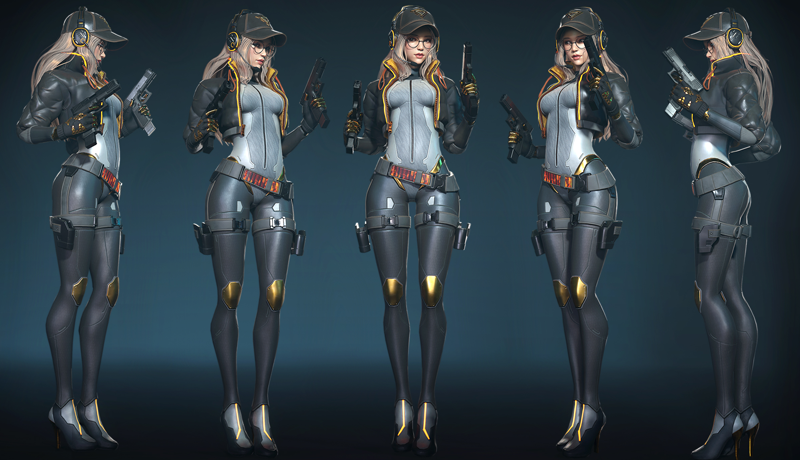 You’ve spent hours meticulously sculpting and texturing, yet the final render still feels a bit… amateur. It’s a common bottleneck. The issue often isn’t a lack of effort, but a missing piece in the fundamental pipeline or a subtle technique that separates good from great. Many practitioners find themselves hitting a wall trying to replicate that professional game-ready look.
💡 3 Core Workflow Shifts for Professional 3D Character Art
1. Solidify Your Foundation: The Essential Pipeline Structure
It’s not just about learning individual tools; it’s about understanding how they connect. This course emphasizes building a robust workflow from the ground up, ensuring that each step—from initial blocking in ZBrush to final presentation in Marmoset—integrates seamlessly. Think of it as constructing a house; you need a strong foundation before you start placing walls. This systematic approach prevents rework and ensures your character has structural integrity from the beginning.
2. Sculpting with Intent: Balancing Detail and Optimization
Many artists get lost in the high-poly sculpting phase, creating excessive detail that becomes a nightmare for retopology and performance. The key here is sculpting with intent, focusing on forms that will translate effectively into a low-poly mesh. This involves understanding how polygons behave and planning your sculpt so that key details are emphasized where they matter most, rather than being lost in unnecessary subdivisions. This smart sculpting saves significant time during the optimization phase.
3. The Power of Presentation: Mastering Marmoset for Final Output
Your character is only as good as its presentation. This course dives deep into leveraging Marmoset Toolbag, not just for rendering, but for showcasing your model’s best attributes. It’s about understanding lighting setups, material properties, camera angles, and posing to highlight the quality of your sculpting and texturing. Mastering these presentation skills can dramatically elevate how your work is perceived, making your models stand out in portfolios and game engines.
🛠️ Key Skills & Details That Define Professional Quality
Moving beyond basic software functions, this training hones in on the practical application of tools within a professional game development pipeline. It’s about developing an eye for form, understanding edge flow for deformation, and mastering texture creation that tells a story.
- Polygon Management: Learn how to organize polygons efficiently during the modeling stage. This includes understanding how to create clean topology that deforms well and is easy to UV unwrap.
- High-Poly to Low-Poly Workflow: Grasp the crucial techniques for baking normal maps and other essential texture maps from high-poly sculpts to low-poly models. This process is fundamental for achieving detailed characters in real-time environments.
- Texturing for Realism: Explore how to use Substance Painter to create materials that feel grounded and realistic. This involves layering textures, understanding roughness and metallic maps, and utilizing procedural tools to add wear and tear.
- Detail Sculpting: Discover methods for sculpting intricate details like clothing folds, accessories, and facial features in ZBrush, ensuring these elements enhance, rather than detract from, the overall character silhouette.
- Presentation Excellence: Utilize Marmoset Toolbag’s advanced features to create compelling renders. This includes setting up dynamic lighting, fine-tuning post-processing effects, and composing shots that best showcase the character’s design and technical execution.
💬 Frequently Asked Questions
Q. As a 3D Artist, how can I effectively transition from basic modeling to complex character creation?
A. Focus on understanding the entire character pipeline, not just isolated modeling tasks. This course emphasizes learning the workflow from ZBrush for sculpting, 3ds Max for base modeling and optimization, Substance Painter for texturing, and Marmoset for final presentation. Building a solid foundation in each stage is key to tackling complex characters successfully.
Q. As a 3D Artist, what’s the most impactful skill to develop for improving character model quality?
A. Mastering the art of presentation is often underestimated. While sculpting and texturing are critical, learning to use tools like Marmoset Toolbag to its full potential—understanding lighting, camera work, and material setup—can elevate your work from good to exceptional. The way a model is showcased significantly impacts its perceived quality.
Q. As a 3D Artist, how can I ensure my low-poly models look as detailed as my high-poly sculpts?
A. The secret lies in a well-executed baking process. This involves creating clean UV layouts for your low-poly models and understanding how to capture the essential forms and details from your high-poly sculpts into normal maps and other texture maps. Attention to detail in both the high-poly sculpt and the low-poly optimization is crucial.
👉 Want to Go Deeper?
Ready to build your own portfolio-ready 3D characters? Dive into the full curriculum and unlock the secrets behind AAA game character art.