🛠️ Key Skills & Details That Define Professional Quality
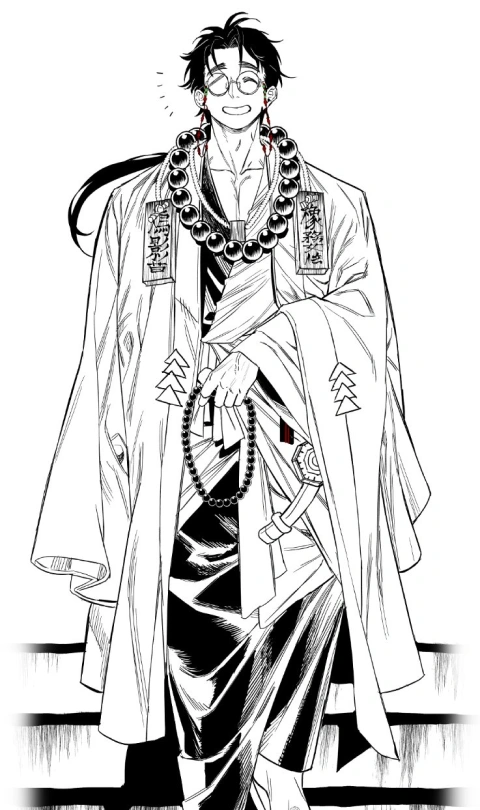
- Brush Control is Paramount: Mastering Illustrator’s brush settings, particularly pressure sensitivity and variable stroke profiles, is crucial. Experiment with different brush tips to achieve distinct line qualities for outlines, shading, and detail work.
- Strategic Line Weight for Form: Doko emphasizes using thicker lines for areas in shadow or closer to the viewer, and thinner lines for highlights or receding elements. This simple adjustment creates a strong sense of depth.
- Hatching for Volume: Instead of simple shading, think of hatching as building form with lines. Understand how to layer lines at different angles to create subtle tonal shifts and define the curvature of objects.
- Anatomy as a Foundation for Posing: Study basic anatomical landmarks and their effect on posture. This knowledge allows you to break free from repetitive poses and create more believable, dynamic character interactions. Applying this anatomical understanding to even simple croquis exercises daily yields significant improvement.
💬 Frequently Asked Questions
Q. How can I improve my character line art in Illustrator?
A. Focus on line weight variation. Use a pressure-sensitive stylus and explore Illustrator’s brush options to achieve diverse line qualities. Thicker lines can define contours and shadows, while thinner lines can add detail and suggest form.
Q. What’s the best way to learn Doko’s hatching techniques for depth?
A. Start with simple hatching patterns on basic geometric shapes to understand how line direction and density affect perceived volume. Practice layering these strokes consistently, paying attention to how they interact with the light source in your illustration.
Q. How does Illustrator help in achieving dramatic character poses according to Doko?
A. Illustrator’s vector nature allows for precise manipulation of curves and lines, making it ideal for refining dynamic poses. Doko’s workflow often involves sketching poses and then meticulously tracing and refining them with vector paths, ensuring clean lines and strong silhouettes.