💡 3 Core Principles for Dynamic Portraits
1. Beyond Anatomy: Capturing the Essence with Brush Economy
The true magic of expressive portraiture isn’t just about perfect facial anatomy; it’s about strategic mark-making. Think about “brush economy”—using the fewest, most impactful strokes to convey form, texture, and emotion. This means understanding how individual brush strokes build up volume and define planes, rather than just filling in color. It’s not just about learning the technique—it’s about shifting how you think about each mark as a building block of life.
2. Workflow Efficiency: Mastering Custom Brushes and Palettes
To achieve that dynamic, lifelike feel consistently, you need a streamlined workflow. This involves leveraging custom tools. The expert relies on a curated set of 20 essential brushes that are proven to deliver professional results. Equally important is understanding how to design your own custom digital brushes, learning the specific settings that achieve that perfect painterly feel. Paired with 10 professionally curated palettes, this allows for seamless color exploration and application, drastically cutting down production time while maintaining artistic integrity.
3. The Finishing Detail: Imbuing Texture and Flow in Hair
Hair often separates a good portrait from a great one. Instead of treating it as a single mass, focus on individual strands and how light interacts with them. A deep dive into hair painting reveals techniques for creating realistic flow and texture. This involves layering, understanding edge control, and utilizing specific brush settings to mimic the subtle variations in light reflection and shadow. This one extra step elevates your output quality from looking rendered to looking naturally organic.
🛠️ Key Skills & Details That Define Professional Quality
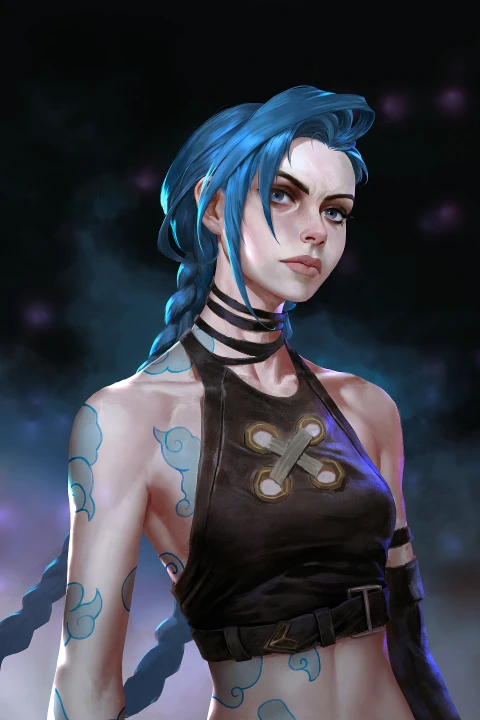
Translating traditional painting wisdom into digital execution requires a specific set of practical skills. It’s about more than just knowing which tool to click; it’s about understanding the why behind the digital brushstroke. This includes mastering brush control and pressure dynamics to mimic the organic feel of physical paint, allowing for subtle shifts in opacity and texture that bring a portrait to life. Beyond drawing, consider the principles of color and light: using curated palettes not just for aesthetic appeal, but to strategically build form and mood. The detailed exercises and reference materials provided are designed to hone these skills, enabling you to build a versatile toolkit for creating portraits with rich textures, depth, and undeniable personality.
💬 Frequently Asked Questions
Q. How can an Illustrator create more expressive portraits from reference images?
A. An Illustrator can create more expressive portraits by focusing on brush economy—using deliberate strokes to build form and emotion—and by mastering custom brushes and palettes to streamline the workflow. Paying close attention to the subtle details, like the flow and texture of hair, also significantly enhances expressiveness.
Q. What are some essential tools an Illustrator should consider for digital portraiture?
A. For digital portraiture, an Illustrator should explore a robust set of custom brushes designed for painterly effects, alongside carefully curated color palettes. The ability to design and tweak brush settings to achieve specific textures and line quality is crucial for professional results.
Q. How does an Illustrator transition from basic portraiture to creating more original, compelling works?
A. The transition involves a deeper understanding of traditional painting principles, such as understanding how light interacts with form and the strategic application of color. By developing a unique approach to brushwork and composition, and by experimenting beyond simple reference replication, an Illustrator can cultivate a more original artistic voice.