Mastering Expressive Character Sheets: Illustrator Ovotheartist’s Workflow Secrets
🧐 That Frustrating Moment When Your Character Sheet Feels Flat
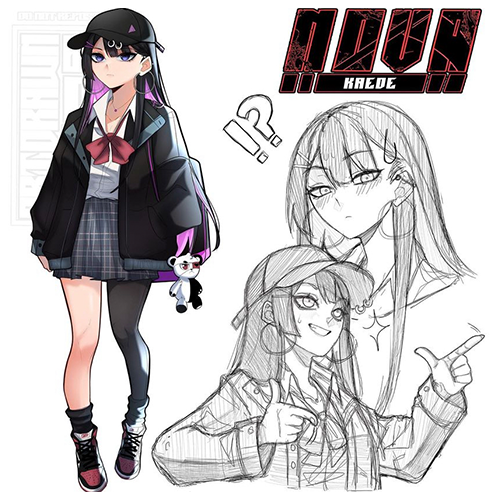 You meticulously craft every detail, yet the final character sheet still lacks that undeniable spark. Turns out, the secret to truly expressive characters isn’t just about drawing perfectly — it’s about understanding the subtle yet crucial elements that give them personality.
💡 3 Core Tips from Illustrator Ovotheartist to Elevate Your Character Sheets
1. The Power of the “Purposeful Border”
Illustrator Ovotheartist emphasizes that a well-chosen border isn’t just decorative; it frames your character’s personality. The key is to select a color that complements the character’s dominant traits or hair color, creating a cohesive visual language. This one tweak can seriously level up your output. It’s not just about learning the technique — it’s about shifting how you think about composition.
2. Streamlining Your Color Palette Presentation
To ensure others can accurately replicate your character’s colors, Ovotheartist demonstrates a smart workflow for presenting the flat color palette. By using the selection tool to create a rectangle for each flat color and arranging them neatly, you provide a clear, actionable reference. This method is simple but incredibly effective for maintaining color consistency across different projects or for collaboration.
3. The “Shadow Layer” for Depth
A signature detail Ovotheartist employs is adding a subtle “shadow layer” to the main character art. By clipping a jet-black layer and carefully erasing the parts that shouldn’t be shadowed, you create a gentle depth that makes the character pop without overpowering the design. This small addition gives the sheet a more polished, professional finish.
🛠️ Key Skills & Details That Define Professional Quality
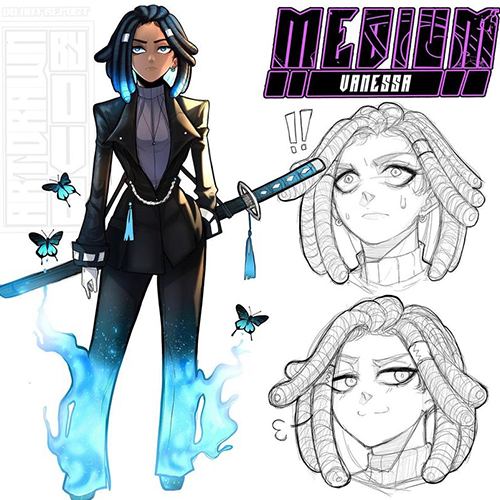
To achieve that professional polish on your character sheets, focus on these practical techniques:
- Brush Control for Expressions: When drawing facial expressions, Ovotheartist stresses using a Tapered or Rough pencil brush. This allows for softer shading that adds a natural, sketched feel, enhancing the expressiveness without looking overly harsh. Adjusting the brush’s opacity slightly further refines this softer look.
- Strategic Layer Management: Don’t shy away from using numerous layers, especially when dealing with complex elements like hair or detailed expressions. Ovotheartist advocates for using layer folders to keep everything organized. This makes it easy to locate and adjust specific elements, like redrawing hair or refining eye shapes, without affecting the rest of the design.
- Refining for Readability: For elements like the character’s name on the sheet, ensure it’s clearly readable. Ovotheartist suggests using a stylized font but making sure it doesn’t obscure the character’s identity. If a font is too stylized, consider simplifying or adding a subtle border effect to make it stand out against the artwork.
- Consistent Anatomy Across Expressions: When drawing multiple expressions, duplicating the base head shape and then modifying it for each expression ensures consistency. This saves time and helps maintain the character’s core features, making the sheet feel unified. Always focus on making the expressions clean, even if they are just sketches.
💬 Frequently Asked Questions
Q. How can Illustrator Ovotheartist’s technique for presenting color palettes be applied in my workflow?
A. Illustrator Ovotheartist’s method involves using the selection tool to create rectangles for each flat color, then arranging them on a separate layer. This clear presentation ensures that anyone wanting to draw or color the character has direct access to the intended flat colors, which is crucial for maintaining consistency, especially after the character has been rendered with shading and lighting.
Q. What is the best way to ensure character consistency when drawing multiple expressions, according to Illustrator Ovotheartist?
A. Illustrator Ovotheartist recommends duplicating the base head sketch when creating different facial expressions. This ensures that the core proportions and features of the character remain consistent across all expressions. Minor adjustments can then be made to features like eyes, eyebrows, and mouth to convey the desired emotion while maintaining the character’s overall likeness.
Q. Why does Illustrator Ovotheartist suggest adding a subtle shadow layer to the final character sheet?
A. The shadow layer, clipped and carefully erased, adds a soft depth and polish to the character sheet. It helps the character artwork stand out from the background and gives the overall presentation a more professional and visually appealing quality, making the character feel more dimensional.