💡 3 Core Principles for Professional TouchDesigner Output
1. Master the Node-Based Workflow: Think Visually, Not Linearly
The fundamental advantage of TouchDesigner lies in its visual, node-based programming. Instead of getting lost in lines of code, focus on understanding how data flows between different operator types (TOPs, MATs, CHOPs, SOPs). This visual approach allows for rapid prototyping and intuitive debugging. It’s not just about learning the techniques; it’s about shifting how you think about creative processes – from linear scripting to interconnected data streams.
2. Leverage Real-Time Engine Power: Efficiency Through Iteration
TouchDesigner excels as a real-time engine. The most effective workflow involves embracing iterative development. Start with a core concept, build a functional prototype, and then refine it. Most pros work this way: they don’t aim for perfection in the first pass. Instead, they establish a robust feedback loop, constantly tweaking parameters and observing results in real-time, which drastically cuts down production time and encourages experimentation.
3. The ‘One Extra Step’ for Polish: Contextualizing Your Visuals
A common pitfall is stopping at functional visuals. Professionals elevate their work by considering the context and presentation. This often means adding subtle touches: refining lighting and rendering for depth, implementing smooth transitions, or ensuring audio reactivity feels organic rather than forced. This one extra step – considering the holistic experience and adding contextual polish – can seriously level up your output quality.
🛠️ Key Skills & Details That Define Professional Quality
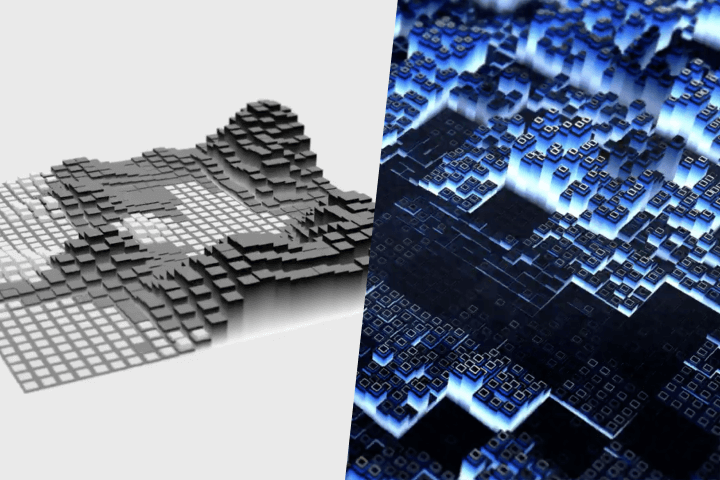
Moving beyond basic functionality, true professional quality in media art with TouchDesigner hinges on specific practical skills:
- Advanced Instancing Techniques: Effectively using instancing for geometry, particularly with heightmaps derived from noise or external data, is crucial. This allows for the creation of complex, responsive terrains and particle systems that react dynamically to audio or user input. Mastering instancing significantly boosts visual complexity and performance.
- Real-Time Lighting and Rendering: Understanding Physically Based Rendering (PBR) materials and how to implement Environment Lighting, including sky spheres and HDRI maps, is vital for creating believable and immersive scenes. Correctly applying lighting and shadows adds significant depth and realism to your interactive pieces.
- Robust Interaction System Design: Implementing interactive elements using cameras, Kinect sensors, or even simple mouse/keyboard inputs requires a solid grasp of data flow and operator communication. This involves not just receiving data but processing it effectively to drive visual changes in a way that feels intuitive and responsive to the audience.
- Optimized Performance and Output: Professionals always consider performance. This means optimizing your TouchDesigner patches by understanding SOP and CHOP structures, managing texture memory efficiently, and knowing when to use render instancing or other performance-enhancing techniques. Final output, whether for live performance or installation, requires careful consideration of movie file out settings and project optimization.
💬 Frequently Asked Questions
Q. Mediaartist, what is the primary benefit of using only TouchDesigner for a project?
Mediaartist, the primary benefit of mastering TouchDesigner as a single, comprehensive tool is workflow efficiency and creative freedom. It eliminates the need to juggle multiple software packages, streamlining the process from concept to final output, and allows for deep integration of interactive and audio-visual elements without complex coding barriers.
Q. Mediaartist, how can I ensure my interactive art feels genuinely responsive?
Mediaartist, genuine responsiveness comes from thoughtful data mapping and real-time feedback. Focus on how input data (like mouse position, camera tracking, or audio levels) directly influences visual parameters (like color, scale, or movement) in a way that feels natural and immediate. Iterative testing and adjusting the sensitivity curves are key to achieving this.
Q. Mediaartist, what’s the most impactful “extra step” for elevating my TouchDesigner visuals?
Mediaartist, the most impactful extra step often involves refining the presentation and contextualization of your visuals. This means paying close attention to detail in lighting, material properties, and smooth parameter transitions. Ensuring your audio-visual elements are tightly synchronized and emotionally resonant with the accompanying sound can also significantly elevate the final impact.