Pixel Art Animation: Mastering Frame Counts for Fluid Motion
🧐 Frustrated with Jittery Pixel Art Animations? Your Frame Count Might Be the Culprit.
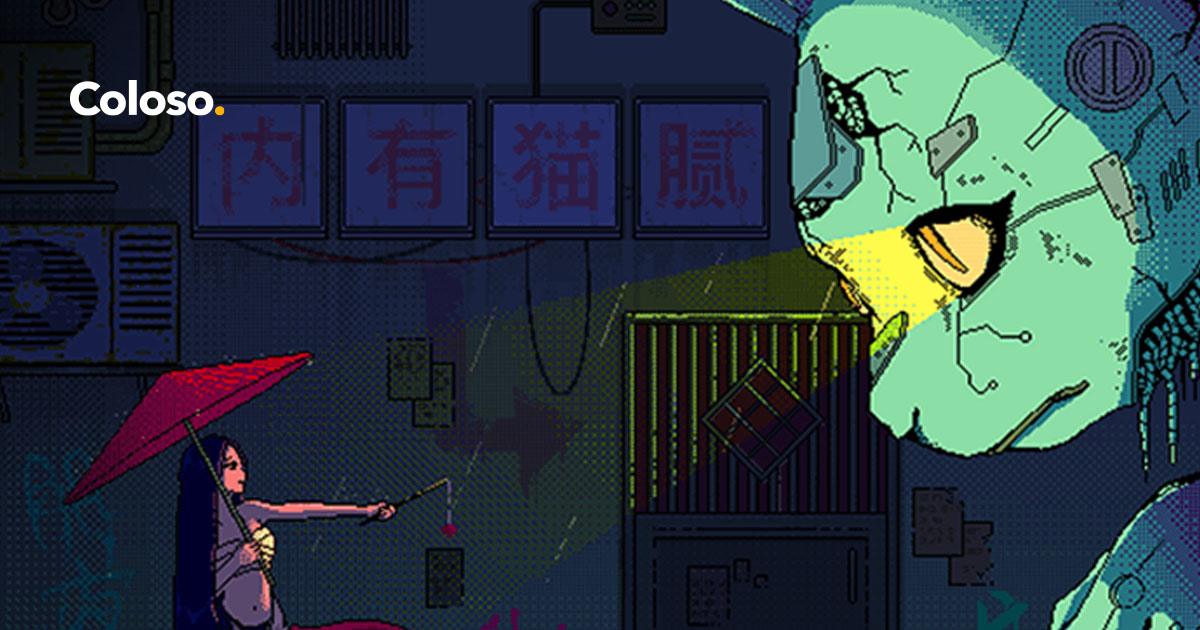 You’ve meticulously crafted your pixel art, only to find the animation feels choppy or, worse, unwatchable. It’s a common roadblock, but the fix often lies in understanding how frame counts and frame rates directly impact the final look. Let’s dive into Zannen’s approach to breathing life into static images.
💡 Zannen’s Core Animation Workflow Secrets
1. The Art of “Drawing with Animation in Mind”: Plan Your Frames Early
To achieve that fluid, immersive quality, Zannen emphasizes planning your frame count before you start drawing. For instance, Zannen breaks down animations like the “fabric blowing in the wind” into roughly eight unique frames, animating on twos (meaning each frame is held for two screen refresh cycles) for a natural motion at 15 FPS. This strategic planning ensures smooth transitions and avoids the common pitfall of animating elements too quickly or too slowly.
2. Efficient Layer Management: Nesting for Clarity and Speed
Zannen’s workflow hinges on clean layer management. Before diving into animation, Zannen duplicates and renames layers like “rain” into specific formats such as “rain 8f 1s” (8 unique frames, animated on ones). This practice not only keeps projects organized but also allows for intuitive application of blend modes (like ‘Addition’ for rain or ‘Multiply’ for ripples) and frame rates. This meticulous layering saves significant time later when fine-tuning animations.
3. The “Lazy” Outline Technique: Smart Work for Better Results
Tired of manually drawing outlines for every single frame? Zannen shares a brilliant shortcut: duplicate your silhouette layer, alpha-lock it, fill it with your line art color, and then strategically shift duplicate layers by one pixel in different directions (up, down, left, right). Merging these shifted layers creates clean, consistent line art across all eight unique frames in under 15 minutes, a massive time-saver compared to manual drawing.
🛠️ Key Skills & Details That Define Professional Quality
Zannen’s approach focuses on practical, hands-on techniques that elevate pixel art animation from hobbyist to professional quality.
- Frame Planning & Timing: Zannen meticulously plans animation cycles based on desired motion. For example, a spinning fan blade might be animated using eight unique frames, running on twos or threes, fitting perfectly within a 24-frame cycle for smooth looping when the total frame count is higher. Rain animations, while potentially needing 12-24 unique frames for a full-screen effect, can be condensed to eight unique frames when confined to a specific area, moving “on ones” (one unique frame per screen refresh) for rapid descent.
- Strategic Use of Blend Modes & Layers: Employing ‘Addition’ blend mode for bright, energetic elements like raindrops, and ‘Multiply’ for contrasting, grounded effects like ripples, creates depth and visual interest. Zannen’s emphasis on naming layers descriptively (e.g., “Raindrops 12f 2s”) ensures clarity and efficiency when managing complex animations involving multiple elements.
- Visual Storytelling through Texture & Form: For elements like the “fabric blowing in the wind,” Zannen uses a guideline based on sine waves to establish the core motion. They then introduce intentional “tears” or holes in the fabric. This isn’t just an artistic choice; it serves as a compositional anchor, helping the audience understand the fabric’s rotation in 3D space through subtle visual cues.
- Animation Math in Practice: Zannen highlights that even complex animations rely on understandable math. For instance, animating ripples requires understanding how to expand them naturally, possibly using 12 frames for a more realistic spread compared to the eight frames used for faster elements. This focus on timing and repetition ensures each element feels intentional and contributes to the overall immersive quality of the scene.
💬 Frequently Asked Questions
Q. How can I make my pixel art animations look more professional?
Pixelartist Zannen recommends meticulously planning your frame counts and frame rates from the outset. For instance, animating a fabric element on twos at 15 FPS can achieve a natural, flowing look. This strategic approach, combined with efficient layer management and smart techniques like the “lazy” outline method, significantly boosts the perceived quality and professionalism of your animations.
Q. What’s the best way to create smooth looping animations in pixel art?
Pixelartist Zannen demonstrates that understanding the “math” behind animation, such as utilizing powers of 24 for frame cycles or choosing appropriate frame counts (e.g., eight unique frames for a fan, twelve for raindrops), is key. By syncing element movements with the overall scene’s frame rate and using techniques like sine waves for natural motion, you can create fluid, believable loops.
Q. How do I decide the right frame count for different animation elements?
Pixelartist Zannen advises considering the element’s intended speed and visual complexity. For fast-moving effects like rain, eight unique frames running on ones might suffice if confined to a small area. For more detailed movements or a sense of natural flow, like fabric or ripples, 12 unique frames, possibly animated on twos, provide better results. Always aim to avoid repeating animation patterns too quickly, which can break the illusion.